

Two Fixes for Your Joomla 5 TinyMCE Editor
by Eric Peterson
Problem 1 - Joomla 5 TinyMCE Editor Alignment:
Over the past year I've been updating and client's websites from Joomla 4 to Joomla 5. As I was doing the upgrades, I notice a problem with the TinyMCE editor and the was it was handling images when they were aligned to the left or right.
Problem 2 - Joomla 5 TinyMCE Editor won't install scripts:
One of my websites for an art gallery that I helped found ran into a problem with installing a script after upgrading Joomla from 4 to 5. This gallery uses the same program that real estate company's use for a virtual tour of a home, and use it to give visitors a virtual experience of exhibits at our art center in Wyoming, MN. To do this, the tour is processed on a program called Matterport and is installed by embedding a script in a Joomla article. Well, after upgrading to Joomla 5, all we saw was a gray block. After inspecting the source code, I discovered the script was sandboxed (a security feature). Even if you chose in the options to allow scripts, it wouldn't eliminate the sandboxing of the script.
The Fix for both TinyMCE problems...
Download this fix and install it like any other plugin on your Joomla 5 platform...
Download the TinyMCE fix
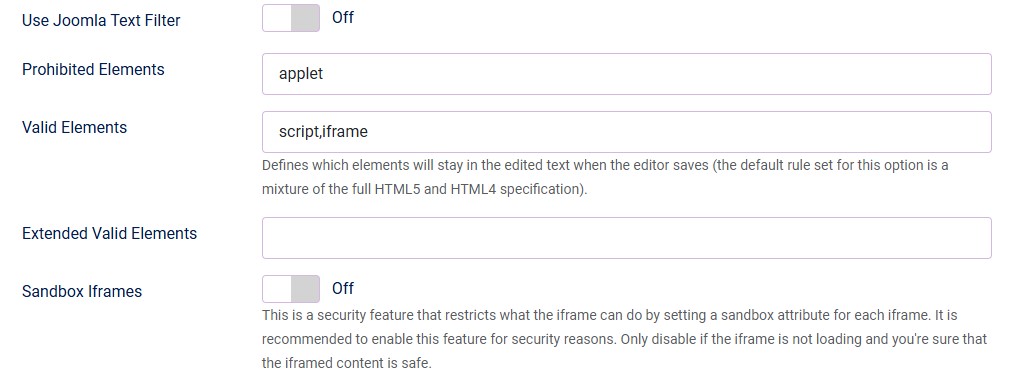
Be sure to adjust TinyMCE settings to:
*Update*
I've discovered that as of Joomla 5.2.2 updates are overwriting this fix. Save the fix and reinstall after updates if things aren't working right.